
Analytix for Google Analytics12.4 - Get APK
You'll be able to download in few seconds.
Publisher Description
!!IMPORTANT if you would like to run Analytix on your Honeycomb tablet, choose Analytix HD instead. This is optimized for Honeycomb tablets!
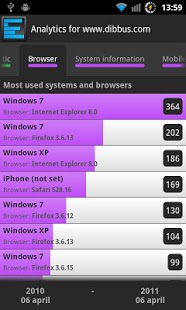
Analytix is an application for visualizing Google Analytics data near real-time(hourly view!!!) and is serving great and clean visualizations. I've been working with some of the best SEO experts to create a nice compilation of the most used features and most wanted data.
Analytix will visualize the following Google Analytics data:
1. Visits per date(year/month/week/day/hour via slider)
2. Top referring pages
3. Visits by country
4. Previous and next page
5. Search engines
6. Pageviews
7. Top keywords
8. Top landing pages
9. Top problematic pages
10. Top browsers
11. System information
12. Network information
13. Mobile traffic
14. Visitor based conversion rate
15. Revenues by date(year/month/week/day/hour via slider)
16. Total revenues by type
17. Social revenues
18. Social pageviews
19. Application pageviews(for android developers)
20. Application events(for android developers)
21. Adwords clicks and impressions
22. Adwords matched query
23. Total events
24. Event categories
25. Event actions
26. Event labels
27. Google Pagespeed
28. Pageload time
Analytics will visualize Google Analytics data with advanced graphics and charts. Compare today's results with yesterday or last week within 2 clicks!
In the preference screen you can define:
1. start-date
2. end-date(optional), today is default as end-date
3. number of results
4. which tabs should be visible
5. remove stored data
Feel free to contact me for requests and/or bugs/errors. This application is optimized for mdpi and hdpi devices and tested on several devices. If it doesn't work on your device please let me know!
For updates, follow Analytix on Twitter:
http://twitter.com/AndroidAnalytix
About Analytix for Google Analytics
The company that develops Analytix for Google Analytics is Folkert. The latest version released by its developer is 12.4.
To install Analytix for Google Analytics on your Android device, just click the green Continue To App button above to start the installation process. The app is listed on our website since 2012-08-25 and was downloaded 0 times. We have already checked if the download link is safe, however for your own protection we recommend that you scan the downloaded app with your antivirus. Your antivirus may detect the Analytix for Google Analytics as malware as malware if the download link to com.dibbus.analytix is broken.
How to install Analytix for Google Analytics on your Android device:
- Click on the Continue To App button on our website. This will redirect you to Google Play.
- Once the Analytix for Google Analytics is shown in the Google Play listing of your Android device, you can start its download and installation. Tap on the Install button located below the search bar and to the right of the app icon.
- A pop-up window with the permissions required by Analytix for Google Analytics will be shown. Click on Accept to continue the process.
- Analytix for Google Analytics will be downloaded onto your device, displaying a progress. Once the download completes, the installation will start and you'll get a notification after the installation is finished.
Program Details
System requirements
Download information
Pricing
Version History
version 12.4
posted on 2012-08-25
12.4,- Bugfix, removed latest old api calls.,- accounts will have it's own list,12.3,- Fixed "No data issue",- Using new Google Api V3,- Modified dashboard, highly requested! More like Analytix HD version,- Added zero day option to timespan to get the today's results.,If the No data still exists, please let me know!
version 9.1.1
posted on 2011-06-02
Several fixes and updates
Disclaimer
External Download
We do not host Analytix for Google Analytics on our servers. We did not scan it for viruses, adware, spyware or other type of malware. This app is hosted by Galad and passed their terms and conditions to be listed there. We recommend caution when installing it.
The APK Download link for Analytix for Google Analytics is provided to you by apps112.com without any warranties, representations or guarantees of any kind, so access it at your own risk.
If you have questions regarding this particular app contact the publisher directly. For questions about the functionalities of apps112.com contact us.
